> ## Documentation Index
> Fetch the complete documentation index at: https://docs.somark.cn/llms.txt
> Use this file to discover all available pages before exploring further.
# 概览
> SoMarkDown — Markdown 超集,支持数学公式、化学结构式、代码高亮等专业渲染能力
## 什么是 SoMarkDown
在信息爆炸的时代,我们创造内容的方式,决定了知识传承的形态与效率。Markdown 以其简洁优雅,已成为数字时代书写的基础语法。然而,随着知识边界不断扩展——从复杂的数学公式、精密的化学结构式与方程式,到需要深度交互的代码块与语义化文本标注——现有的标记语言常常在表现力与简洁性之间陷入两难。
**SoMarkDown** 是一个旨在融合社区智慧、拥抱专业表达、并致力于成为未来事实标准的开源标记语言规范。
 标记语言规范与参考实现
开箱即用的 Web 渲染组件
面向 Gradio 的 SoMarkDown 渲染组件
SoMarkDown 并非从头造轮子。在谨慎调研后,我们整合并优化了社区广泛认可的各类专业渲染方案。
## 生态项目
### SoMarkDownViewer
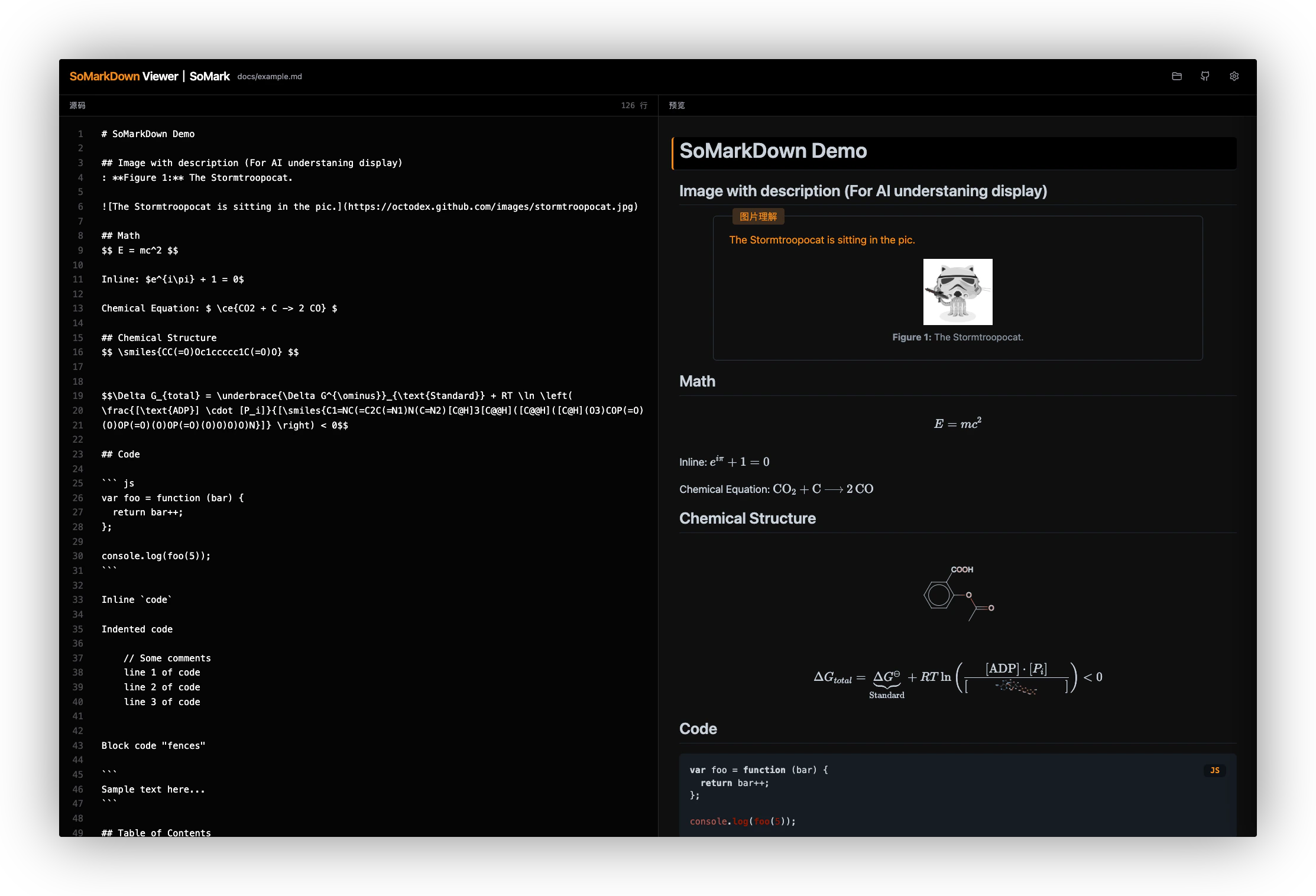
`SoMarkDownViewer` 是一个开箱即用的 Web 渲染组件,用于在浏览器中展示 SoMarkDown 内容。它适合文档查看、解析结果预览、知识库阅读等前端场景。
* 项目地址:[SoMarkAI/SoMarkDownViewer](https://github.com/SoMarkAI/SoMarkDownViewer)
* 适用场景:需要在 Web 页面中直接渲染 SoMarkDown 内容
### gradio\_somarkdown
`gradio_somarkdown` 是一个 Gradio 自定义组件,用于在 Python 应用中使用 SoMarkDown 渲染能力。它可替代默认的 `gr.Markdown`,并支持 KaTeX 数学公式、SMILES 化学结构式、mhchem 化学方程式、代码高亮与目录等能力。
* 项目地址:[SoMarkAI/gradio\_somarkdown](https://github.com/SoMarkAI/gradio_somarkdown)
* 适用场景:需要在 Gradio 应用中稳定显示 SoMarkDown 内容(例如文档解析结果、科研内容、技术报告)
## 底层技术栈
| 能力 | 方案 |
| ----------- | ----------------------------------------------------------------------------------------------------------- |
| 基础 Markdown | [CommonMark 最新规范](https://spec.commonmark.org/) + [markdown-it](https://github.com/markdown-it/markdown-it) |
| 数学公式 | [KaTeX](https://katex.org) |
| 化学方程式 | [mhchem](https://mhchem.github.io/MathJax-mhchem) |
| 化学结构式 | [SmilesDrawer](https://github.com/reymond-group/smilesDrawer) |
| 代码高亮 | [highlight.js](https://github.com/highlightjs/highlight.js) |
| 流程图 | [Mermaid](https://github.com/mermaid-js/mermaid) |
## 核心特性
**🧬 基础能力:**
* **Markdown 超集**:遵从 CommonMark 规范,完全兼容标准 Markdown。
* **段落映射**:自动注入行号属性,实现类似 VSCode 中 Markdown 的同步滚动和映射跳转。
* **高速渲染**:基于 markdown-it 优化,渲染速度快,支持大文档渲染。
* **多主题**:内置亮色、暗色、学术风格等多种主题。
* **通用性**:支持浏览器和 Node.js 服务端渲染。
**✨ 特色组件:**
* **📐 数学公式**:集成 [KaTeX](https://katex.org/) 支持 LaTeX 数学公式,包含 `mhchem` 化学方程式扩展。
* **🧪 化学结构式**:集成 [SmilesDrawer](https://github.com/reymond-group/smilesDrawer) 渲染 SMILES 字符串,并创新支持 LaTeX 与 SMILES 语法合并,极大扩展了化学结构式的表达能力。
* **🎨 代码高亮**:通过 [highlight.js](https://highlightjs.org/) 自动检测并高亮代码块。
* **📑 目录生成**:自动生成目录(TOC)。
* **🖼️ 图片理解**:支持图片语义理解内容的展示。
* **🏷️ Caption**:支持图和表的 Caption 表达。
## 底层技术栈
| 能力 | 方案 |
| ----------- | --------------------------------------------------------------------------------------------------------- |
| 基础 Markdown | [CommonMark 规范](https://spec.commonmark.org/) + [markdown-it](https://github.com/markdown-it/markdown-it) |
| 数学公式 | [KaTeX](https://katex.org) |
| 化学方程式 | [mhchem](https://mhchem.github.io/MathJax-mhchem) |
| 化学结构式 | [SmilesDrawer](https://github.com/reymond-group/smilesDrawer) |
| 代码高亮 | [highlight.js](https://github.com/highlightjs/highlight.js) |
| 流程图 | [Mermaid](https://github.com/mermaid-js/mermaid)(开发中) |
## 与 SoMark API 的关系
SoMark 文档智能解析 API 输出的 Markdown 格式内容遵循 SoMarkDown 规范。解析结果中的公式、化学结构式、表格、图片语义描述等,均可通过 SoMarkDown 兼容渲染器正确显示;如果你先想从接入侧跑通,可以看 [SoMark API](/documentation/api) 或 [SoMark SDK](/documentation/sdk)。
## 安装
**npm:**
```bash theme={null}
npm install somarkdown
```
**CDN(浏览器):**
```html theme={null}
```
**从源码编译:**
```bash theme={null}
git clone https://github.com/SoMarkAI/SoMarkDown.git
cd somarkdown
npm install
npm run build
```
## 基本用法
项目的 `example/browser` 中提供了浏览器示例,编译后可直接打开 `example/browser/index.html` 查看效果。
```javascript theme={null}
import SoMarkDown from 'somarkdown';
import 'somarkdown/dist/somarkdown.css';
const somarkdown = new SoMarkDown({
lineNumbers: { enable: true }
});
const markdown = `
# SoMarkDown Demo
## Math
$$ E = mc^2 $$
## Chemical Structure
$$\\smiles{CC(=O)Oc1ccccc1C(=O)O}$$
## Chemistry (mhchem)
$$ \\ce{CO2 + C -> 2 CO} $$
`;
const html = somarkdown.render(markdown);
console.log(html);
```
## 配置选项
```javascript theme={null}
const config = {
linkify: true, // 自动将 URL 转为链接
typographer: true, // 启用引号美化等语言中立替换
imgDescEnabled: true, // 是否显示图片描述
lineNumbers: {
enable: true, // 启用行号注入(用于双向同步)
nested: true // 是否为嵌套块(列表项、引用等)注入行号
},
katex: {
throwOnError: false,
errorColor: '#cc0000'
},
toc: {
includeLevel: [1, 2, 3] // 目录包含的标题级别
},
smiles: {
disableColors: false,
width: 300,
height: 200
}
};
const somarkdown = new SoMarkDown(config);
```
完整配置项请参考源码 `src/core/config.js`。
## 主题
SoMarkDown 内置三种主题,在容器 class 上添加对应类名即可切换:
| 类名 | 说明 |
| ---------------- | ------------------------- |
| `theme-light` | 亮色主题(默认),适用于一般阅读 |
| `theme-dark` | 暗色主题,专为低光照环境设计,颜色深、对比度高 |
| `theme-academic` | 学术风格主题,专为学术论文设计,颜色对比强、字体大 |
## JS API
### `new SoMarkDown(config)`
创建一个新的渲染器实例。
### `render(src: string): string`
将 SoMarkDown 源码渲染为 HTML 字符串。
## 开源协议
[MIT License](https://github.com/SoMarkAI/SoMarkDown/blob/master/LICENSE)
标记语言规范与参考实现
开箱即用的 Web 渲染组件
面向 Gradio 的 SoMarkDown 渲染组件
SoMarkDown 并非从头造轮子。在谨慎调研后,我们整合并优化了社区广泛认可的各类专业渲染方案。
## 生态项目
### SoMarkDownViewer
`SoMarkDownViewer` 是一个开箱即用的 Web 渲染组件,用于在浏览器中展示 SoMarkDown 内容。它适合文档查看、解析结果预览、知识库阅读等前端场景。
* 项目地址:[SoMarkAI/SoMarkDownViewer](https://github.com/SoMarkAI/SoMarkDownViewer)
* 适用场景:需要在 Web 页面中直接渲染 SoMarkDown 内容
### gradio\_somarkdown
`gradio_somarkdown` 是一个 Gradio 自定义组件,用于在 Python 应用中使用 SoMarkDown 渲染能力。它可替代默认的 `gr.Markdown`,并支持 KaTeX 数学公式、SMILES 化学结构式、mhchem 化学方程式、代码高亮与目录等能力。
* 项目地址:[SoMarkAI/gradio\_somarkdown](https://github.com/SoMarkAI/gradio_somarkdown)
* 适用场景:需要在 Gradio 应用中稳定显示 SoMarkDown 内容(例如文档解析结果、科研内容、技术报告)
## 底层技术栈
| 能力 | 方案 |
| ----------- | ----------------------------------------------------------------------------------------------------------- |
| 基础 Markdown | [CommonMark 最新规范](https://spec.commonmark.org/) + [markdown-it](https://github.com/markdown-it/markdown-it) |
| 数学公式 | [KaTeX](https://katex.org) |
| 化学方程式 | [mhchem](https://mhchem.github.io/MathJax-mhchem) |
| 化学结构式 | [SmilesDrawer](https://github.com/reymond-group/smilesDrawer) |
| 代码高亮 | [highlight.js](https://github.com/highlightjs/highlight.js) |
| 流程图 | [Mermaid](https://github.com/mermaid-js/mermaid) |
## 核心特性
**🧬 基础能力:**
* **Markdown 超集**:遵从 CommonMark 规范,完全兼容标准 Markdown。
* **段落映射**:自动注入行号属性,实现类似 VSCode 中 Markdown 的同步滚动和映射跳转。
* **高速渲染**:基于 markdown-it 优化,渲染速度快,支持大文档渲染。
* **多主题**:内置亮色、暗色、学术风格等多种主题。
* **通用性**:支持浏览器和 Node.js 服务端渲染。
**✨ 特色组件:**
* **📐 数学公式**:集成 [KaTeX](https://katex.org/) 支持 LaTeX 数学公式,包含 `mhchem` 化学方程式扩展。
* **🧪 化学结构式**:集成 [SmilesDrawer](https://github.com/reymond-group/smilesDrawer) 渲染 SMILES 字符串,并创新支持 LaTeX 与 SMILES 语法合并,极大扩展了化学结构式的表达能力。
* **🎨 代码高亮**:通过 [highlight.js](https://highlightjs.org/) 自动检测并高亮代码块。
* **📑 目录生成**:自动生成目录(TOC)。
* **🖼️ 图片理解**:支持图片语义理解内容的展示。
* **🏷️ Caption**:支持图和表的 Caption 表达。
## 底层技术栈
| 能力 | 方案 |
| ----------- | --------------------------------------------------------------------------------------------------------- |
| 基础 Markdown | [CommonMark 规范](https://spec.commonmark.org/) + [markdown-it](https://github.com/markdown-it/markdown-it) |
| 数学公式 | [KaTeX](https://katex.org) |
| 化学方程式 | [mhchem](https://mhchem.github.io/MathJax-mhchem) |
| 化学结构式 | [SmilesDrawer](https://github.com/reymond-group/smilesDrawer) |
| 代码高亮 | [highlight.js](https://github.com/highlightjs/highlight.js) |
| 流程图 | [Mermaid](https://github.com/mermaid-js/mermaid)(开发中) |
## 与 SoMark API 的关系
SoMark 文档智能解析 API 输出的 Markdown 格式内容遵循 SoMarkDown 规范。解析结果中的公式、化学结构式、表格、图片语义描述等,均可通过 SoMarkDown 兼容渲染器正确显示;如果你先想从接入侧跑通,可以看 [SoMark API](/documentation/api) 或 [SoMark SDK](/documentation/sdk)。
## 安装
**npm:**
```bash theme={null}
npm install somarkdown
```
**CDN(浏览器):**
```html theme={null}
```
**从源码编译:**
```bash theme={null}
git clone https://github.com/SoMarkAI/SoMarkDown.git
cd somarkdown
npm install
npm run build
```
## 基本用法
项目的 `example/browser` 中提供了浏览器示例,编译后可直接打开 `example/browser/index.html` 查看效果。
```javascript theme={null}
import SoMarkDown from 'somarkdown';
import 'somarkdown/dist/somarkdown.css';
const somarkdown = new SoMarkDown({
lineNumbers: { enable: true }
});
const markdown = `
# SoMarkDown Demo
## Math
$$ E = mc^2 $$
## Chemical Structure
$$\\smiles{CC(=O)Oc1ccccc1C(=O)O}$$
## Chemistry (mhchem)
$$ \\ce{CO2 + C -> 2 CO} $$
`;
const html = somarkdown.render(markdown);
console.log(html);
```
## 配置选项
```javascript theme={null}
const config = {
linkify: true, // 自动将 URL 转为链接
typographer: true, // 启用引号美化等语言中立替换
imgDescEnabled: true, // 是否显示图片描述
lineNumbers: {
enable: true, // 启用行号注入(用于双向同步)
nested: true // 是否为嵌套块(列表项、引用等)注入行号
},
katex: {
throwOnError: false,
errorColor: '#cc0000'
},
toc: {
includeLevel: [1, 2, 3] // 目录包含的标题级别
},
smiles: {
disableColors: false,
width: 300,
height: 200
}
};
const somarkdown = new SoMarkDown(config);
```
完整配置项请参考源码 `src/core/config.js`。
## 主题
SoMarkDown 内置三种主题,在容器 class 上添加对应类名即可切换:
| 类名 | 说明 |
| ---------------- | ------------------------- |
| `theme-light` | 亮色主题(默认),适用于一般阅读 |
| `theme-dark` | 暗色主题,专为低光照环境设计,颜色深、对比度高 |
| `theme-academic` | 学术风格主题,专为学术论文设计,颜色对比强、字体大 |
## JS API
### `new SoMarkDown(config)`
创建一个新的渲染器实例。
### `render(src: string): string`
将 SoMarkDown 源码渲染为 HTML 字符串。
## 开源协议
[MIT License](https://github.com/SoMarkAI/SoMarkDown/blob/master/LICENSE)