> ## Documentation Index
> Fetch the complete documentation index at: https://docs.somark.cn/llms.txt
> Use this file to discover all available pages before exploring further.
# Using SoMark in Feishu
> Parse documents in Feishu workflows with the 文档智能解析(转 markdown)
## Install the plugin
In Feishu, open the **Plugin Marketplace**, search for **文档智能解析(转 markdown)**, and install it.
In your Bitable workflow action, you need to fill in **API Key**. Prepare your SoMark API key in advance.
No API key yet? [Go to the SoMark API workbench to get your API key](https://somark.tech/workbench/apikey). Free quota does not need to be claimed and is automatically credited to your account (500 pages/day, 2000 pages/month).
***
## Use the plugin in a Bitable workflow
In your target Bitable, prepare an **Attachment** field to upload/store files. If you want to save the parsed result back into Bitable, add a **Text** field (optional).
Open your Bitable and go to **Workflow** to create a new workflow.
Choose a trigger (for example **Record created/updated** or **Manual trigger**) and make sure the trigger provides the record variables that include your attachment field.
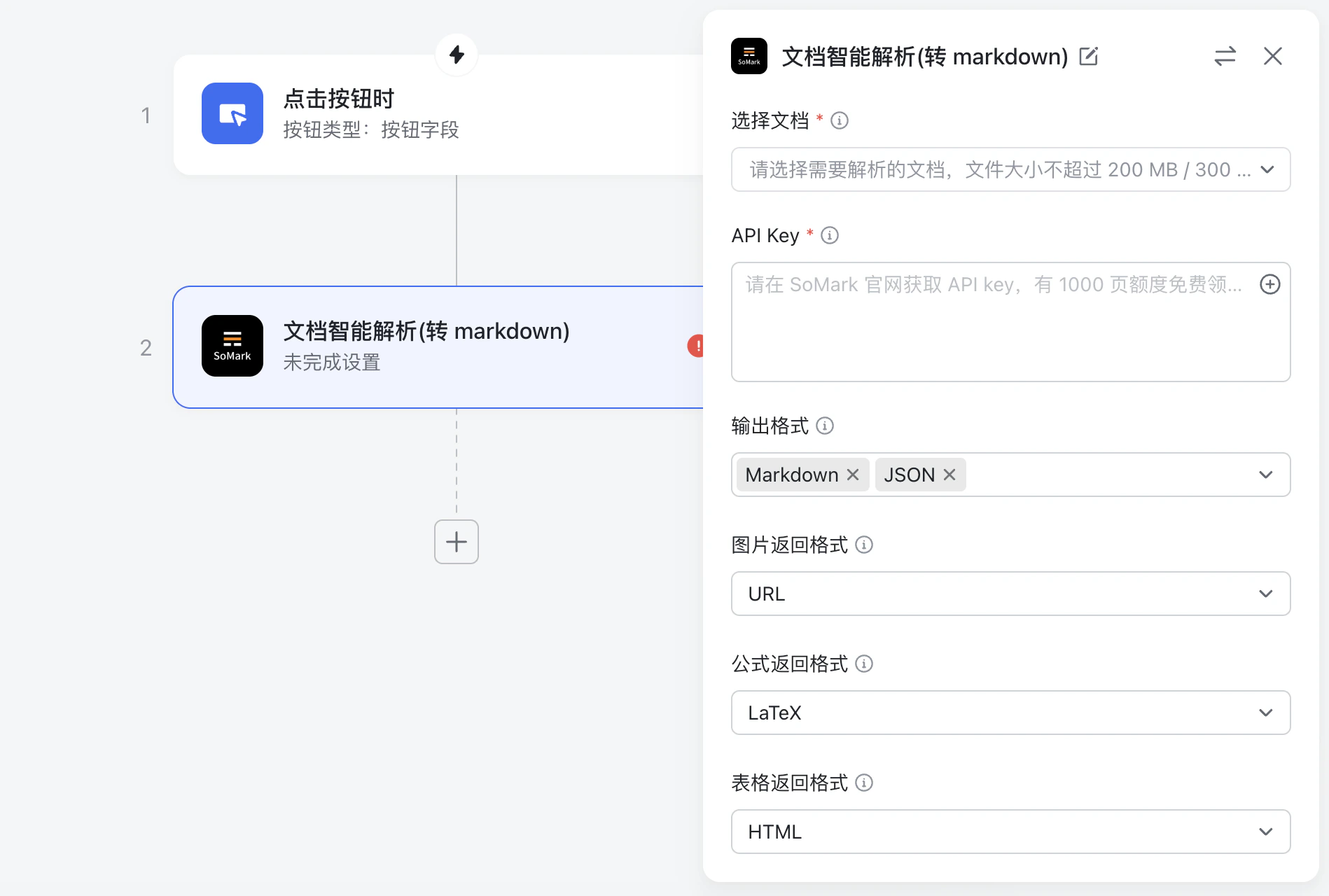
In workflow actions, find and add **文档智能解析(转 markdown)**.
Configure the following fields in the action panel:
* **Select document**: Bind it to the attachment field from your trigger (or a file output from a previous step).
* **API Key**: Paste your SoMark API key, or click the **+** button on the right to insert a workflow variable/secret (recommended).
* (Optional) Configure other parameters such as **Output Formats**, **Image Format**, **Formula Format**, and **Table Format** as needed. If left empty, defaults apply. If you don’t select **Output Formats**, the action returns both `Markdown` and `JSON` by default. See **Input parameters** below for details.
 Reference output variables in subsequent actions, for example writing `markdown` to a Bitable text field or sending it to a chat.
***
## Parameters and outputs
### Input parameters
| Parameter | Type | Description |
| ----------------------------------------- | ---------------- | ------------------------------------------------------------------------------------------------- |
| Select document (`选择文档`) | Attachment field | The document to parse |
| API Key | Text | Your SoMark API key. Prefer injecting it via a workflow variable mapping instead of hardcoding it |
| Output Formats (`输出格式`) | Multi-select | `Markdown` or `JSON`. Default: `Markdown,JSON` |
| Image Format (`图片返回格式`) | Single-select | `URL`, `Base64`, `none`. Default: `URL` |
| Formula Format (`公式返回格式`) | Single-select | `LaTeX`, `MathML`, `ASCII`. Default: `LaTeX` |
| Table Format (`表格返回格式`) | Single-select | `HTML`, `Markdown`, `Image`. Default: `HTML` |
| Chemical Structure Format (`化学结构式返回格式`) | Single-select | Currently supports `Image` only. Default: `Image` |
| Enable Text Cross Page (`文字跨页拼接`) | Single-select | Default: `Off` |
| Enable Table Cross Page (`表格跨页拼接`) | Single-select | Default: `Off` |
| Enable Title Level Recognition (`标题层级识别`) | Single-select | Default: `Off` |
| Enable Inline Image (`保留文中图`) | Single-select | Default: `Off` |
| Enable table Image (`保留表中图`) | Single-select | Default: `On` |
| Enable Image Understanding (`图片理解`) | Single-select | Default: `On` |
| Keep Header Footer (`保留页眉页脚`) | Single-select | Default: `Off` |
### Results
| Field | Type | Description |
| ---------------------------- | ------ | --------------- |
| Task ID (`task_id`) | string | Task ID |
| Status (`status`) | string | Task status |
| Markdown result (`markdown`) | string | Markdown result |
| JSON result (`json`) | string | JSON result |
Reference output variables in subsequent actions, for example writing `markdown` to a Bitable text field or sending it to a chat.
***
## Parameters and outputs
### Input parameters
| Parameter | Type | Description |
| ----------------------------------------- | ---------------- | ------------------------------------------------------------------------------------------------- |
| Select document (`选择文档`) | Attachment field | The document to parse |
| API Key | Text | Your SoMark API key. Prefer injecting it via a workflow variable mapping instead of hardcoding it |
| Output Formats (`输出格式`) | Multi-select | `Markdown` or `JSON`. Default: `Markdown,JSON` |
| Image Format (`图片返回格式`) | Single-select | `URL`, `Base64`, `none`. Default: `URL` |
| Formula Format (`公式返回格式`) | Single-select | `LaTeX`, `MathML`, `ASCII`. Default: `LaTeX` |
| Table Format (`表格返回格式`) | Single-select | `HTML`, `Markdown`, `Image`. Default: `HTML` |
| Chemical Structure Format (`化学结构式返回格式`) | Single-select | Currently supports `Image` only. Default: `Image` |
| Enable Text Cross Page (`文字跨页拼接`) | Single-select | Default: `Off` |
| Enable Table Cross Page (`表格跨页拼接`) | Single-select | Default: `Off` |
| Enable Title Level Recognition (`标题层级识别`) | Single-select | Default: `Off` |
| Enable Inline Image (`保留文中图`) | Single-select | Default: `Off` |
| Enable table Image (`保留表中图`) | Single-select | Default: `On` |
| Enable Image Understanding (`图片理解`) | Single-select | Default: `On` |
| Keep Header Footer (`保留页眉页脚`) | Single-select | Default: `Off` |
### Results
| Field | Type | Description |
| ---------------------------- | ------ | --------------- |
| Task ID (`task_id`) | string | Task ID |
| Status (`status`) | string | Task status |
| Markdown result (`markdown`) | string | Markdown result |
| JSON result (`json`) | string | JSON result |